<?xml version="1.0" encoding="utf-8"?><feed xmlns="http://www.w3.org/2005/Atom" ><generator uri="https://jekyllrb.com/" version="4.4.1">Jekyll</generator><link href="https://chatterbot.us/feed.xml" rel="self" type="application/atom+xml" /><link href="https://chatterbot.us/" rel="alternate" type="text/html" /><updated>2026-08-18T12:42:33+00:00</updated><id>https://chatterbot.us/feed.xml</id><title type="html">ChatterBot</title><subtitle>ChatterBot is a machine-learning based conversational dialog engine built in Python for creating intelligent chatbots. Generate natural language responses  using NLP, training data, and logic adapters. Build AI chatbots with spaCy,  NLTK integration, and deploy conversational AI applications easily.</subtitle><entry><title type="html">How to Write a Great GitHub Issue: A Guide for Open Source Contributors</title><link href="https://chatterbot.us/2026/03/how-to-open-a-github-issue/" rel="alternate" type="text/html" title="How to Write a Great GitHub Issue: A Guide for Open Source Contributors" /><published>2026-03-12T11:00:00+00:00</published><updated>2026-03-12T11:00:00+00:00</updated><id>https://chatterbot.us/2026/03/how-to-open-a-github-issue</id><content type="html" xml:base="https://chatterbot.us/2026/03/how-to-open-a-github-issue/"><![CDATA[<p>Open source software thrives on collaboration. Every time someone reports a bug, suggests a feature, or asks a well-formulated question, the project takes a step forward. For projects like ChatterBot, the GitHub issue tracker is the central hub for this collaboration.</p>

<p>However, writing a good GitHub issue is a skill. A well-written ticket gives maintainers exactly what they need to understand, reproduce, and fix the problem. A poorly written ticket, on the other hand, can lead to endless back-and-forth threads, frustration, and delayed fixes.</p>

<p>Whether you are a seasoned developer or a first-time contributor, here is a guide on the best ways to open GitHub issues, along with a few examples of what to avoid.</p>

<h2 id="what-not-to-do-the-anti-patterns">What Not to Do: The Anti-Patterns</h2>

<p>Before diving into the perfect issue template, let’s look at a few common pitfalls. Maintainers often sift through a high volume of tickets, and certain types of messages make it nearly impossible to provide help.</p>

<p><strong>The “Out of Scope” Ticket</strong></p>

<blockquote>
  <p>“Help, I can’t install Python.”</p>
</blockquote>

<p>This is a generalized example of a common anti-pattern. Without knowing the operating system, the Python version, the exact code being run, the full error traceback, or what steps have already been taken to try and fix it, maintainers are left guessing.</p>

<p>When project trackers are flooded with vague, low-effort tickets, it takes a heavy toll on the people volunteering their time to manage them. Fostering a sustainable environment where maintainers and contributors can collaborate effectively is crucial for the health of any project. If you are interested in how the community can build a more positive and sustainable ecosystem moving forward, check out this perspective on <a href="https://blog.salvius.org/2026/01/an-optimistic-outlook-for-future-of.html">an optimistic outlook for the future of open source</a>.</p>

<h2 id="the-anatomy-of-a-great-issue">The Anatomy of a Great Issue</h2>

<p>To ensure your issue gets the attention it deserves, always include the following elements:</p>

<ol>
  <li>
    <p>Search First: Before clicking “New Issue,” briefly search the existing open and closed issues. Someone else may have already reported the same problem or found a workaround.</p>
  </li>
  <li>
    <p>A Descriptive Title: Summarize the problem clearly. Instead of “Database broken,” use “SQLite OperationalError when initializing ChatBot in Python 3.12.”</p>
  </li>
  <li>
    <p>Environment Details: Always list your Operating System, the project version you are using, and your language version (e.g., Python 3.13).</p>
  </li>
  <li>
    <p>Steps to Reproduce: Provide a minimal, reproducible example. What exact steps or code snippet will cause the error to appear?</p>
  </li>
  <li>
    <p>Expected vs. Actual Behavior: Explain what you thought was going to happen, and what actually happened instead.</p>
  </li>
  <li>
    <p>Troubleshooting Steps Taken: Share what you have already tried to do to solve the issue. This saves maintainers from suggesting fixes you’ve already ruled out.</p>
  </li>
</ol>

<p>While <strong>all</strong> of these pieces of information are certainly never an absolute requirement, considering if these elements should be included in a GitHub issue <em>is</em>.</p>

<h2 id="examples-of-great-issues">Examples of Great Issues</h2>

<h3 id="example-1-the-bug-report">Example 1: The Bug Report</h3>

<p><strong>Title:</strong> <code class="language-plaintext highlighter-rouge">TypeError in TimeLogicAdapter when passing custom datetime object</code></p>

<p><strong>Description:</strong><br />
Environment:<br />
OS: Ubuntu 22.04<br />
Python Version: 3.11<br />
ChatterBot Version: 1.1.x</p>

<p><strong>Expected Behavior:</strong><br />
The <code class="language-plaintext highlighter-rouge">TimeLogicAdapter</code> should return a response containing the current time when triggered, even if a custom localized datetime object is passed in the kwargs.</p>

<p><strong>Actual Behavior:</strong><br />
The bot crashes with a TypeError: can’t compare offset-naive and offset-aware datetimes.</p>

<p><strong>Steps to Reproduce:</strong></p>

<div class="language-python highlighter-rouge"><div class="highlight"><pre class="highlight"><code><span class="kn">from</span> <span class="n">chatterbot</span> <span class="kn">import</span> <span class="n">ChatBot</span>
<span class="kn">import</span> <span class="n">datetime</span>
<span class="kn">import</span> <span class="n">pytz</span>

<span class="n">chatbot</span> <span class="o">=</span> <span class="nc">ChatBot</span><span class="p">(</span>
    <span class="sh">'</span><span class="s">TestBot</span><span class="sh">'</span><span class="p">,</span>
    <span class="n">logic_adapters</span><span class="o">=</span><span class="p">[</span><span class="sh">'</span><span class="s">chatterbot.logic.TimeLogicAdapter</span><span class="sh">'</span><span class="p">]</span>
<span class="p">)</span>

<span class="c1"># Passing a timezone-aware datetime causes the crash
</span><span class="n">custom_time</span> <span class="o">=</span> <span class="n">datetime</span><span class="p">.</span><span class="n">datetime</span><span class="p">.</span><span class="nf">now</span><span class="p">(</span><span class="n">pytz</span><span class="p">.</span><span class="n">UTC</span><span class="p">)</span>
<span class="n">chatbot</span><span class="p">.</span><span class="nf">get_response</span><span class="p">(</span><span class="sh">"</span><span class="s">What time is it?</span><span class="sh">"</span><span class="p">,</span> <span class="n">additional_kwargs</span><span class="o">=</span><span class="p">{</span><span class="sh">'</span><span class="s">time</span><span class="sh">'</span><span class="p">:</span> <span class="n">custom_time</span><span class="p">})</span>
</code></pre></div></div>

<p><strong>What I’ve Tried:</strong></p>

<p>I traced the error to line 42 in <code class="language-plaintext highlighter-rouge">time_adapter.py</code>. I tried stripping the timezone info before passing it, which acts as a temporary workaround, but the adapter should probably handle both naive and aware datetimes natively. I’d be happy to submit a Pull Request if you agree with this approach!</p>

<h3 id="example-2-the-feature-request">Example 2: The Feature Request</h3>

<p><strong>Title:</strong> <code class="language-plaintext highlighter-rouge">Add support for PostgreSQL JSONB fields in storage adapter</code></p>

<p><strong>Description:</strong></p>

<p>Currently, the SQL storage adapter handles statement metadata by serializing it. For users scaling ChatterBot on PostgreSQL databases, leveraging native JSONB columns for metadata would significantly improve search performance and allow for more complex filtering.</p>

<p><strong>Proposed Solution:</strong></p>

<p>Introduce a check in the SQLAlchemy models that detects if the dialect is PostgreSQL, and if so, utilizes <code class="language-plaintext highlighter-rouge">JSONB</code> for the <code class="language-plaintext highlighter-rouge">tags</code> and <code class="language-plaintext highlighter-rouge">in_response_to</code> fields rather than standard text.</p>

<p><strong>Alternatives Considered:</strong></p>

<p>I considered writing a completely separate <code class="language-plaintext highlighter-rouge">PostgresStorageAdapter</code>, but integrating it into the existing SQL storage adapter via dialect checks seems cleaner and easier to maintain.</p>

<hr />

<p>By taking a few extra minutes to provide context, code snippets, and troubleshooting history, you respect the maintainers’ time and dramatically increase the chances of your issue being resolved quickly. Open source is a team effort, and a great GitHub issue is the best way to start the conversation.</p>]]></content><author><name>{&quot;picture&quot;=&gt;&quot;/img/chatterbot.png&quot;, &quot;github&quot;=&gt;&quot;gunthercox&quot;, &quot;twitter&quot;=&gt;&quot;gunthercox&quot;, &quot;website&quot;=&gt;&quot;https://gunthercox.com&quot;}</name></author><category term="community" /><category term="open-source" /><summary type="html"><![CDATA[Open source software thrives on collaboration. Every time someone reports a bug, suggests a feature, or asks a well-formulated question, the project takes a step forward. For projects like ChatterBot, the GitHub issue tracker is the central hub for this collaboration.]]></summary><media:thumbnail xmlns:media="http://search.yahoo.com/mrss/" url="https://chatterbot.us/img/articles/05-circuit.jpg" /><media:content medium="image" url="https://chatterbot.us/img/articles/05-circuit.jpg" xmlns:media="http://search.yahoo.com/mrss/" /></entry><entry><title type="html">An AI Interface Style Guide</title><link href="https://chatterbot.us/2026/01/ai-style-guide/" rel="alternate" type="text/html" title="An AI Interface Style Guide" /><published>2026-01-25T01:53:00+00:00</published><updated>2026-01-25T01:53:00+00:00</updated><id>https://chatterbot.us/2026/01/ai-style-guide</id><content type="html" xml:base="https://chatterbot.us/2026/01/ai-style-guide/"><![CDATA[<p>Do you recall the prolific web interface style guides that emerged during the mid-2000s up until the late 2010s? This was an era in which some might recall the prolific push of buzzwords such as “HTML5” and “CSS3”, alongside the emergence of UI frameworks like Bootstrap and Foundation. During this period we watched as the popularity and rationale behind various design standards rose and fell.</p>

<p>The release of Windows 8 in 2010 brought Microsoft’s “Metro UI” to the forefront of consumer software, featuring flat, colorful, square aesthetics organized into minimalist grids.Later, in 2014, Google published their UI design guidelines under the title “Material Design”. The primary angle for Material Design being the notion that the behavior of the user interface should resemble the behavior physical materials in the real world.</p>

<p>In more recent news (2025), Apple has introduced a controversial UI pattern in the latest version of its Mac and iOS dubbed “Liquid Glass”. While usability critiques seem to be a constant in design guidelines historically, the central truth is that there is genuine benefit from discussing and deliberating over established design and usability guidelines.</p>

<p>Perfectly ideal design guidance may never truly exist. As technology and society coexist and develop alongside one another the requirements and expectations of interfaces will continue to evolve.</p>

<p>Nothing can be said more of the advances and influences of technology than the significant advances in AI in the last few years. It is rapidly becoming apparent that the limitations imposed by past interface constraints are no longer present. Voice and video communication are becoming as easy to access as text. A fundamental change in the way we interact with software is just beginning to take shape.</p>

<p>So, let’s talk about designing for ideal user experiences in applications where the prolific availability of AI tools makes their inclusion in software inevitable. The guidelines that follow are based on my experience to date, building and using AI interfaces, and as I mentioned previously, I hope that they might face discussion and debate to help shape better designs in the future.</p>

<h2 id="1-summarization-when-to-use-it">1. Summarization: When to Use It</h2>

<p>Summarization is remarkably easy to build and add to most interfaces. This is often one of the first AI features that is pushed into apps to help brands put an “AI” label on their products in an attempt to look smart and cutting edge. The real truth is that there are only some cases where this functionality is useful. More often than not, poorly implemented summarization leads to a cluttered UI and leaves AI-tired users annoyed at the extraneous feature.</p>

<h3 id="when-summarization-adds-value">When Summarization Adds Value</h3>

<p><strong>Long-form content that users need to triage quickly:</strong> 
Email threads with dozens of replies, lengthy documentation, research papers, and meeting transcripts. These are ideal candidates because users need to decide whether to invest time reading the full content, and a summary helps them make that decision.</p>

<p><strong>Repetitive information across multiple sources:</strong>
When users are reviewing similar items (support tickets, customer feedback, news articles), summaries help identify patterns without requiring everything to be read verbatim.</p>

<p><strong>Content in unfamiliar domains:</strong>
Legal documents, medical records, or technical specifications often benefit from plain-language summaries that make specialized content accessible to non-experts.</p>

<h3 id="when-to-avoid-summarization">When to Avoid Summarization</h3>

<div class="alert alert-warning" role="alert">
<strong>Warning:</strong> Never add summarization to content that's already brief. If users can read the full content in under 30 seconds, showing them a 20-second summary is pointless interface clutter.
</div>

<p><strong>Critical information where accuracy matters:</strong>
Financial statements, legal agreements, security alerts (anything where missing a detail has consequences should not be summarized by default). Users need to read the original.</p>

<p><strong>Creative or emotional content:</strong>
Poetry, fiction, personal messages. Summarizing these often strips away the very elements that make them valuable. The journey is the destination.</p>

<p><strong>Already-structured content:</strong>
If your content has clear headers, bullet points, and organization, it’s already scannable. Adding AI summarization is redundant.</p>

<h3 id="implementation-patterns">Implementation Patterns</h3>

<p>Generally, when you do implement summarization, consider progressive disclosure unless delivering a pre-generated result effects the delivery of the content in a beneficial way, such as a scenario where users would typically always choose to generate the summary:</p>

<div class="language-python highlighter-rouge"><div class="highlight"><pre class="highlight"><code><span class="c1"># Good: Opt-in summarization
</span><span class="o">&lt;</span><span class="n">article</span><span class="o">&gt;</span>
  <span class="o">&lt;</span><span class="n">h1</span><span class="o">&gt;</span><span class="p">{</span> <span class="n">article</span><span class="p">.</span><span class="n">title</span> <span class="p">}</span><span class="o">&lt;/</span><span class="n">h1</span><span class="o">&gt;</span>
  <span class="o">&lt;</span><span class="n">p</span> <span class="n">class</span><span class="o">=</span><span class="sh">"</span><span class="s">meta</span><span class="sh">"</span><span class="o">&gt;</span><span class="p">{</span> <span class="n">article</span><span class="p">.</span><span class="n">read_time</span> <span class="p">}</span> <span class="err">·</span> <span class="p">{</span> <span class="n">article</span><span class="p">.</span><span class="n">word_count</span> <span class="p">}</span> <span class="n">words</span><span class="o">&lt;/</span><span class="n">p</span><span class="o">&gt;</span>
  <span class="o">&lt;</span><span class="n">button</span> <span class="n">class</span><span class="o">=</span><span class="sh">"</span><span class="s">btn btn-sm btn-outline-secondary</span><span class="sh">"</span><span class="o">&gt;</span>
    <span class="o">&lt;</span><span class="n">i</span> <span class="n">class</span><span class="o">=</span><span class="sh">"</span><span class="s">icon-sparkles</span><span class="sh">"</span><span class="o">&gt;&lt;/</span><span class="n">i</span><span class="o">&gt;</span> <span class="n">Summarize</span>
  <span class="o">&lt;/</span><span class="n">button</span><span class="o">&gt;</span>
  <span class="o">&lt;</span><span class="n">div</span> <span class="n">class</span><span class="o">=</span><span class="sh">"</span><span class="s">content</span><span class="sh">"</span><span class="o">&gt;</span><span class="p">{</span> <span class="n">article</span><span class="p">.</span><span class="n">body</span> <span class="p">}</span><span class="o">&lt;/</span><span class="n">div</span><span class="o">&gt;</span>
<span class="o">&lt;/</span><span class="n">article</span><span class="o">&gt;</span>

<span class="c1"># Bad: Summary forced on everyone
</span><span class="o">&lt;</span><span class="n">article</span><span class="o">&gt;</span>
  <span class="o">&lt;</span><span class="n">div</span> <span class="n">class</span><span class="o">=</span><span class="sh">"</span><span class="s">ai-summary</span><span class="sh">"</span><span class="o">&gt;</span><span class="p">{</span> <span class="n">ai_summary</span> <span class="p">}</span><span class="o">&lt;/</span><span class="n">div</span><span class="o">&gt;</span>
  <span class="o">&lt;</span><span class="n">details</span><span class="o">&gt;</span>
    <span class="o">&lt;</span><span class="n">summary</span><span class="o">&gt;</span><span class="n">Read</span> <span class="n">full</span> <span class="n">article</span><span class="o">&lt;/</span><span class="n">summary</span><span class="o">&gt;</span>
    <span class="o">&lt;</span><span class="n">div</span> <span class="n">class</span><span class="o">=</span><span class="sh">"</span><span class="s">content</span><span class="sh">"</span><span class="o">&gt;</span><span class="p">{</span> <span class="n">article</span><span class="p">.</span><span class="n">body</span> <span class="p">}</span><span class="o">&lt;/</span><span class="n">div</span><span class="o">&gt;</span>
  <span class="o">&lt;/</span><span class="n">details</span><span class="o">&gt;</span>
<span class="o">&lt;/</span><span class="n">article</span><span class="o">&gt;</span>
</code></pre></div></div>

<p>The first pattern respects user agency. The second assumes the AI knows better than the user what they want to read.</p>

<p><br /></p>

<h2 id="2-chat-interfaces">2. Chat Interfaces</h2>

<p>Chat interfaces have become the default pattern for AI interaction, but they’re not always the right choice. Like command-line interfaces, they’re powerful and flexible, but they also require users to know what to ask for.</p>

<h3 id="when-chat-works-well">When Chat Works Well</h3>

<p><strong>Open-ended tasks:</strong>
When users need to explore possibilities, iterate on ideas, or ask follow-up questions, chat excels. The conversational format supports the back-and-forth needed for refinement.</p>

<p><strong>Complex queries:</strong>
Natural language chat can be easier than filling out a form with 20 fields. “Find me a flight to Tokyo next month under $800 with a window seat” is more natural than navigating multiple dropdown menus.</p>

<p><strong>Learning and exploration:</strong>
When users are trying to understand a topic or troubleshoot a problem, the conversational format feels more supportive than static documentation.</p>

<p><strong>Complex structured data:</strong>
Complex data, such as time-series, row-based, and structured or hierarchical data can be useful to expose chat interfaces to help users quickly come to an understanding and explore trends and patterns within the data. Natural interfaces like these can be simpler to use than building out explicit queries, but ideally both types of interface will be exposed to support novice users alongside power users.</p>

<h3 id="when-traditional-ui-is-better">When Traditional UI is Better</h3>

<p><strong>Simple, repeated actions:</strong>
If users need to do the same thing frequently (like setting a timer or checking the weather), dedicated UI elements are faster than typing the same request every time.</p>

<p><strong>Precise inputs:</strong>
Forms with validation, sliders, date pickers are constrained inputs that help users provide correctly formatted data. Chat often requires multiple exchanges to get structured data right.</p>

<p><strong>Visual comparisons:</strong>
Comparing products, reviewing options, or making choices between alternatives works better with side-by-side layouts than scrolling through chat messages.</p>

<h3 id="design-patterns-for-better-chat">Design Patterns for Better Chat</h3>

<p><strong>Start with suggestions, not a blank box:</strong>
An empty input field is intimidating. Show example prompts or quick actions:</p>

<div class="language-html highlighter-rouge"><div class="highlight"><pre class="highlight"><code><span class="nt">&lt;div</span> <span class="na">class=</span><span class="s">"chat-suggestions"</span><span class="nt">&gt;</span>
  <span class="nt">&lt;button</span> <span class="na">class=</span><span class="s">"suggestion-chip"</span><span class="nt">&gt;</span>Help me draft an email<span class="nt">&lt;/button&gt;</span>
  <span class="nt">&lt;button</span> <span class="na">class=</span><span class="s">"suggestion-chip"</span><span class="nt">&gt;</span>Summarize this document<span class="nt">&lt;/button&gt;</span>
  <span class="nt">&lt;button</span> <span class="na">class=</span><span class="s">"suggestion-chip"</span><span class="nt">&gt;</span>Find similar articles<span class="nt">&lt;/button&gt;</span>
<span class="nt">&lt;/div&gt;</span>
</code></pre></div></div>

<p>This is especially important if you support more advanced functionality within your chat such as image generation, or other types of visual rendering.</p>

<p><strong>Preserve context visually:</strong>
Use visual hierarchy to show what the AI is responding to. Quote the user’s question in the response header, or maintain a sidebar showing the current conversation context.</p>

<p><strong>Make AI limitations transparent:</strong>
If your AI can’t handle certain requests, say so upfront. Don’t let users waste time discovering boundaries through trial and error.</p>

<div class="alert alert-info" role="alert">
<strong>Tip:</strong> The best chat interfaces feel like they're anticipating user needs. Use conversation history and context to proactively offer next steps or related actions.
</div>

<p><strong>Handle errors gracefully:</strong>
When the AI doesn’t understand, offer specific ways to rephrase or switch to traditional UI:</p>

<div class="language-plaintext highlighter-rouge"><div class="highlight"><pre class="highlight"><code>I'm not sure I understand. Did you mean:
• Set a reminder for tomorrow
• Schedule a meeting
• Create a calendar event

Or would you prefer to use the calendar form?
</code></pre></div></div>

<p><br /></p>

<h2 id="3-when-to-use-voice">3. When to use Voice</h2>

<p>Voice interfaces are compelling. They’re hands-free, potentially eyes-free, and feel futuristic. But they’re also prone to errors, socially awkward in public spaces, and often slower than visual interfaces. Use voice where it genuinely helps, not just because you can.</p>

<h3 id="ideal-use-cases">Ideal Use Cases</h3>

<p><strong>Hands-busy, eyes-busy scenarios:</strong>
Driving, cooking, exercising, and other times when users physically can’t interact with a screen. Voice is the only option that works.</p>

<p><strong>Accessibility:</strong>
For users with motor impairments, vision impairments, or reading difficulties, voice interfaces can be transformative. But ensure you’re building for actual accessibility needs, not just checking a box.</p>

<p><strong>Quick, simple commands:</strong>
“Set a timer for 10 minutes” or “Call Mom” work well with voice because they’re unambiguous and fast to speak.</p>

<h3 id="when-to-avoid-voice">When to Avoid Voice</h3>

<p><strong>Noisy environments:</strong>
Coffee shops, open offices, busy streets, and anywhere background noise makes recognition unreliable or using voice socially uncomfortable.</p>

<p><strong>Complex inputs:</strong>
Entering passwords, addresses, or structured data by voice is frustrating. Spelling things out letter-by-letter is slower than typing.</p>

<p><strong>Private information:</strong>
Banking details, medical information, or personal messages should be avoided. Users often don’t want to speak these aloud, even at home.</p>

<h3 id="implementation-considerations">Implementation Considerations</h3>

<p><strong>Always provide visual feedback:</strong>
Even in voice-first interfaces, show what the system heard. Misrecognition is common, and users need to know if they were understood correctly.</p>

<p><strong>Offer push-to-talk, not just wake words:</strong>
Wake words (“Hey Assistant…”) lead to false triggers and constant listening concerns. Give users a button they can press when they want voice input.</p>

<p><strong>Design multimodal fallbacks:</strong>
When voice fails, seamlessly offer visual alternatives. Don’t force users to keep repeating themselves into the void.</p>

<div class="language-python highlighter-rouge"><div class="highlight"><pre class="highlight"><code><span class="c1"># Example multimodal voice interaction
</span><span class="k">if</span> <span class="n">speech_recognition_confidence</span> <span class="o">&lt;</span> <span class="mf">0.7</span><span class="p">:</span>
    <span class="k">return</span> <span class="p">{</span>
        <span class="sh">"</span><span class="s">response</span><span class="sh">"</span><span class="p">:</span> <span class="sh">"</span><span class="s">I didn</span><span class="sh">'</span><span class="s">t quite catch that. Did you say:</span><span class="sh">"</span><span class="p">,</span>
        <span class="sh">"</span><span class="s">suggestions</span><span class="sh">"</span><span class="p">:</span> <span class="n">top_3_interpretations</span><span class="p">,</span>
        <span class="sh">"</span><span class="s">fallback</span><span class="sh">"</span><span class="p">:</span> <span class="sh">"</span><span class="s">Or tap here to type your request</span><span class="sh">"</span>
    <span class="p">}</span>
</code></pre></div></div>

<p><br /></p>

<h2 id="4-auto-complete-and-suggestions">4. Auto-complete and Suggestions</h2>

<p>AI-powered auto-complete and suggestions can accelerate user workflows or drive them mad with constant interruptions. The difference lies in timing, relevance, and control.</p>

<h3 id="suggestions-that-help">Suggestions That Help</h3>

<p><strong>Based on clear patterns:</strong>
If a user always adds the same tags to certain types of documents, suggesting those tags saves time without being intrusive.</p>

<p><strong>Completing tedious but predictable tasks:</strong>
Email greetings, common responses, and boilerplate text are great candidates for AI completion.</p>

<p><strong>When users pause:</strong>
Suggestion timing matters. Show completions when users hesitate or stop typing, not while they’re actively composing.</p>

<h3 id="suggestions-that-annoy">Suggestions That Annoy</h3>

<p><strong>Correcting users who are right:</strong>
If AI constantly suggests changes to correct spelling, terminology, or formatting, users will ignore or disable it. Be confident only when you’re actually confident.</p>

<p><strong>Completing creative work:</strong>
Writing a novel, composing music, or creating art. Users don’t want AI finishing their sentences. The creation process itself is the point.</p>

<p><strong>Interrupting flow:</strong> Popping up suggestions while users are typing breaks concentration. Wait for natural pauses.</p>

<div class="alert alert-warning" role="alert">
<strong>Design Principle:</strong> Auto-complete should feel like a helpful colleague, not a backseat driver. It should accelerate what users already want to do, not redirect them to what the AI thinks they should do.
</div>

<h3 id="give-users-control">Give Users Control</h3>

<p>Always provide an easy way to dismiss or disable suggestions. And make it truly easy, not buried in settings three menus deep:</p>

<div class="language-html highlighter-rouge"><div class="highlight"><pre class="highlight"><code><span class="c">&lt;!-- Inline disable option --&gt;</span>
<span class="nt">&lt;div</span> <span class="na">class=</span><span class="s">"ai-suggestion"</span><span class="nt">&gt;</span>
  <span class="nt">&lt;span</span> <span class="na">class=</span><span class="s">"suggestion-text"</span><span class="nt">&gt;</span>Complete this sentence...<span class="nt">&lt;/span&gt;</span>
  <span class="nt">&lt;button</span> <span class="na">class=</span><span class="s">"btn-dismiss"</span><span class="nt">&gt;</span>✕<span class="nt">&lt;/button&gt;</span>
  <span class="nt">&lt;button</span> <span class="na">class=</span><span class="s">"btn-disable"</span><span class="nt">&gt;</span>Don't suggest for this field<span class="nt">&lt;/button&gt;</span>
<span class="nt">&lt;/div&gt;</span>
</code></pre></div></div>

<p>Having the <code class="language-plaintext highlighter-rouge">Esc</code> key dismiss suggestions can be a natural way to clear generated text recommendation when a keyboard is available.</p>

<p><br /></p>

<h2 id="5-loading-states-and-progressive-responses">5. Loading States and Progressive Responses</h2>

<p>AI responses often take several seconds to generate. How you handle this waiting time dramatically affects perceived performance and user satisfaction.</p>

<h3 id="stream-responses-dont-buffer">Stream Responses, Don’t Buffer</h3>

<p>When possible, stream AI-generated text as it’s created rather than waiting for the complete response:</p>

<div class="language-javascript highlighter-rouge"><div class="highlight"><pre class="highlight"><code><span class="c1">// Stream tokens as they arrive</span>
<span class="k">async</span> <span class="kd">function</span> <span class="nf">streamAIResponse</span><span class="p">(</span><span class="nx">prompt</span><span class="p">)</span> <span class="p">{</span>
  <span class="kd">const</span> <span class="nx">response</span> <span class="o">=</span> <span class="k">await</span> <span class="nf">fetch</span><span class="p">(</span><span class="dl">'</span><span class="s1">/api/generate</span><span class="dl">'</span><span class="p">,</span> <span class="p">{</span>
    <span class="na">method</span><span class="p">:</span> <span class="dl">'</span><span class="s1">POST</span><span class="dl">'</span><span class="p">,</span>
    <span class="na">body</span><span class="p">:</span> <span class="nx">JSON</span><span class="p">.</span><span class="nf">stringify</span><span class="p">({</span> <span class="nx">prompt</span> <span class="p">})</span>
  <span class="p">});</span>

  <span class="kd">const</span> <span class="nx">reader</span> <span class="o">=</span> <span class="nx">response</span><span class="p">.</span><span class="nx">body</span><span class="p">.</span><span class="nf">getReader</span><span class="p">();</span>
  <span class="kd">const</span> <span class="nx">decoder</span> <span class="o">=</span> <span class="k">new</span> <span class="nc">TextDecoder</span><span class="p">();</span>

  <span class="k">while </span><span class="p">(</span><span class="kc">true</span><span class="p">)</span> <span class="p">{</span>
    <span class="kd">const</span> <span class="p">{</span> <span class="nx">done</span><span class="p">,</span> <span class="nx">value</span> <span class="p">}</span> <span class="o">=</span> <span class="k">await</span> <span class="nx">reader</span><span class="p">.</span><span class="nf">read</span><span class="p">();</span>
    <span class="k">if </span><span class="p">(</span><span class="nx">done</span><span class="p">)</span> <span class="k">break</span><span class="p">;</span>

    <span class="kd">const</span> <span class="nx">chunk</span> <span class="o">=</span> <span class="nx">decoder</span><span class="p">.</span><span class="nf">decode</span><span class="p">(</span><span class="nx">value</span><span class="p">);</span>
    <span class="nf">appendToOutput</span><span class="p">(</span><span class="nx">chunk</span><span class="p">);</span> <span class="c1">// Show immediately</span>
  <span class="p">}</span>
<span class="p">}</span>
</code></pre></div></div>

<p>Streaming creates the impression of faster response and gives users something to read while waiting for completion.</p>

<h3 id="progressive-disclosure-for-complex-queries">Progressive Disclosure for Complex Queries</h3>

<p>For tasks with multiple steps (research, analysis, generation), show progress:</p>

<div class="language-plaintext highlighter-rouge"><div class="highlight"><pre class="highlight"><code>✓ Analyzing document structure...
✓ Extracting key points...
⏳ Generating summary...
</code></pre></div></div>

<p>This transforms waiting from dead time into visible progress.</p>

<h3 id="set-expectations-upfront">Set Expectations Upfront</h3>

<p>If a task will take more than a few seconds, tell users before starting:</p>

<div class="language-plaintext highlighter-rouge"><div class="highlight"><pre class="highlight"><code>This analysis typically takes 15-30 seconds. 
[Start Analysis]  [Run in Background]
</code></pre></div></div>

<p>Let users choose whether to wait or continue working.</p>

<p><br /></p>

<h2 id="6-transparency-and-explainability">6. Transparency and Explainability</h2>

<p>Users increasingly want to understand why AI makes certain suggestions or decisions. Building trust requires showing your work.</p>

<h3 id="show-confidence-levels">Show Confidence Levels</h3>

<p>When AI makes predictions or suggestions, indicate certainty:</p>

<div class="language-html highlighter-rouge"><div class="highlight"><pre class="highlight"><code><span class="nt">&lt;div</span> <span class="na">class=</span><span class="s">"ai-classification"</span><span class="nt">&gt;</span>
  <span class="nt">&lt;strong&gt;</span>Category:<span class="nt">&lt;/strong&gt;</span> Technical Documentation
  <span class="nt">&lt;span</span> <span class="na">class=</span><span class="s">"confidence confidence-high"</span><span class="nt">&gt;</span>95% confident<span class="nt">&lt;/span&gt;</span>
<span class="nt">&lt;/div&gt;</span>

<span class="nt">&lt;div</span> <span class="na">class=</span><span class="s">"ai-classification"</span><span class="nt">&gt;</span>
  <span class="nt">&lt;strong&gt;</span>Category:<span class="nt">&lt;/strong&gt;</span> Customer Support
  <span class="nt">&lt;span</span> <span class="na">class=</span><span class="s">"confidence confidence-low"</span><span class="nt">&gt;</span>62% confident<span class="nt">&lt;/span&gt;</span>
  <span class="nt">&lt;button</span> <span class="na">class=</span><span class="s">"btn-verify"</span><span class="nt">&gt;</span>Verify this classification<span class="nt">&lt;/button&gt;</span>
<span class="nt">&lt;/div&gt;</span>
</code></pre></div></div>

<p>Low-confidence results should prompt human review.</p>

<h3 id="cite-your-sources">Cite Your Sources</h3>

<p>When AI generates responses based on specific documents, data, or training materials, link to sources:</p>

<div class="language-plaintext highlighter-rouge"><div class="highlight"><pre class="highlight"><code>Based on the analysis, I recommend increasing the cache timeout.

Sources:
• Performance Report Q4 2025 (Page 12)
• System Architecture Documentation (Section 3.2)
• Similar issue resolved in Ticket #4521
</code></pre></div></div>

<p>This lets users verify information and builds trust in AI outputs.</p>

<h3 id="explain-decisions-when-it-matters">Explain Decisions When It Matters</h3>

<p>For high-stakes decisions such as content moderation, loan approvals, or medical suggestions it is important to provide explanations:</p>

<div class="language-plaintext highlighter-rouge"><div class="highlight"><pre class="highlight"><code>This message was flagged for review because it:
• Contains 3 prohibited keywords
• Matches known spam patterns (85% similarity)
• Sender has no previous message history

Review the message: [View Details]
</code></pre></div></div>

<p>Users need to understand automated decisions, especially when they can appeal them.</p>

<p><br /></p>

<h2 id="7-graceful-degradation-and-error-handling">7. Graceful Degradation and Error Handling</h2>

<p>AI will fail. Models will be unavailable, requests will timeout, and hallucinations will occur. Design for failure from the start.</p>

<h3 id="always-provide-fallbacks">Always Provide Fallbacks</h3>

<p>Never gate core functionality behind AI that might fail:</p>

<div class="language-python highlighter-rouge"><div class="highlight"><pre class="highlight"><code><span class="c1"># Good: AI enhancement with fallback
</span><span class="k">try</span><span class="p">:</span>
    <span class="n">suggestions</span> <span class="o">=</span> <span class="n">ai_model</span><span class="p">.</span><span class="nf">get_suggestions</span><span class="p">(</span><span class="n">context</span><span class="p">)</span>
    <span class="k">return</span> <span class="n">suggestions</span>
<span class="k">except</span> <span class="n">AIServiceError</span><span class="p">:</span>
    <span class="c1"># Fall back to rule-based suggestions
</span>    <span class="k">return</span> <span class="nf">rule_based_suggestions</span><span class="p">(</span><span class="n">context</span><span class="p">)</span>

<span class="c1"># Bad: Hard dependency on AI
</span><span class="n">suggestions</span> <span class="o">=</span> <span class="n">ai_model</span><span class="p">.</span><span class="nf">get_suggestions</span><span class="p">(</span><span class="n">context</span><span class="p">)</span>
<span class="k">return</span> <span class="n">suggestions</span>  <span class="c1"># Breaks if AI is down
</span></code></pre></div></div>

<h3 id="be-honest-about-failures">Be Honest About Failures</h3>

<p>When AI fails, admit it clearly and offer alternatives:</p>

<div class="language-plaintext highlighter-rouge"><div class="highlight"><pre class="highlight"><code>The AI assistant is currently unavailable.

You can:
• Use the manual search feature
• Browse by category
• Try again in a few minutes
</code></pre></div></div>

<p>Don’t show users cryptic error codes or pretend nothing is wrong.</p>

<h3 id="handle-hallucinations">Handle Hallucinations</h3>

<div class="alert alert-danger" role="alert">
<strong>Critical:</strong> Never present AI-generated information as fact without verification, especially in domains where accuracy matters (medical, legal, financial, safety-critical applications).
</div>

<p>Add disclaimers to AI-generated content:</p>

<div class="language-html highlighter-rouge"><div class="highlight"><pre class="highlight"><code><span class="nt">&lt;div</span> <span class="na">class=</span><span class="s">"ai-disclaimer"</span><span class="nt">&gt;</span>
  <span class="nt">&lt;i</span> <span class="na">class=</span><span class="s">"icon-info"</span><span class="nt">&gt;&lt;/i&gt;</span>
  This summary was generated by AI. Please verify important details 
  in the original document.
<span class="nt">&lt;/div&gt;</span>
</code></pre></div></div>

<h2 id="conclusion">Conclusion</h2>

<p>The integration of AI into application interfaces represents a fundamental shift in how we design software, but it shouldn’t mean abandoning the principles of good interface design we’ve spent decades refining. AI features should enhance user capabilities, not replace user agency.</p>

<p>The most successful AI interfaces I’ve built and used share common characteristics: they’re transparent about their limitations, they offer users control and choice, they fail gracefully, and they solve real problems rather than applying technology in search of a use case.</p>

<p>As you design AI-powered features, constantly ask: “Does this make the user’s task genuinely easier, or does it just make our product look more advanced?” If you can’t articulate a clear user benefit, you’re probably building AI for AI’s sake.</p>

<p>The guidelines in this style guide will evolve as our understanding of AI interfaces matures. What works today may be superseded by better patterns tomorrow. But the core principle remains constant: design human interfaces for humans. The technology should serve the user’s goals, not the other way around.</p>

<p>As we move forward, I hope these guidelines spark discussion about what makes AI interfaces truly useful. Share your experiences, challenge these ideas, and help shape the next generation of design patterns. The best interfaces will emerge from thoughtful debate and iteration, not from blindly following any single style guide, even this one.</p>]]></content><author><name>{&quot;picture&quot;=&gt;&quot;/img/chatterbot.png&quot;, &quot;github&quot;=&gt;&quot;gunthercox&quot;, &quot;twitter&quot;=&gt;&quot;gunthercox&quot;, &quot;website&quot;=&gt;&quot;https://gunthercox.com&quot;}</name></author><category term="design" /><category term="interfaces" /><category term="style-guide" /><summary type="html"><![CDATA[A look at interface design patterns and style guides for AI-powered applications]]></summary><media:thumbnail xmlns:media="http://search.yahoo.com/mrss/" url="https://chatterbot.us/img/articles/04-shadow.jpg" /><media:content medium="image" url="https://chatterbot.us/img/articles/04-shadow.jpg" xmlns:media="http://search.yahoo.com/mrss/" /></entry><entry><title type="html">Handling AI Scaling and Reducing Costs</title><link href="https://chatterbot.us/2025/05/ai-scaling-costs/" rel="alternate" type="text/html" title="Handling AI Scaling and Reducing Costs" /><published>2025-05-09T07:03:03+00:00</published><updated>2025-05-09T07:03:03+00:00</updated><id>https://chatterbot.us/2025/05/ai-scaling-costs</id><content type="html" xml:base="https://chatterbot.us/2025/05/ai-scaling-costs/"><![CDATA[<p>When it comes to the programming adage “Speed, Quality, Price: Choose Two” I tend to prefer low price. Perhaps it’s the influence that the <a href="https://peps.python.org/pep-0020/">Zen of Python</a> has had on me, or perhaps it’s simply the trend of software to outpace hardware when it comes to improving efficiency.</p>

<blockquote>
  <p>Now is better than never.
Although never is often better than <em>right</em> now.</p>

  <p>~ Zen of Python</p>
</blockquote>

<p>Regardless, the case I’ll make here is that we can demonstrate a method to handle simple AI tasks at scale favoring queued results that complete eventually over immediate results that require adding resources each time scaling is needed.</p>

<h2 id="scaling-using-a-queue">Scaling using a queue</h2>

<p><img src="/img/diagrams/scaling-using-a-queue.svg" alt="Scaling using a queue" /></p>

<p>The idea here is to handle tasks submitted by users by adding them to a queue, then a task executor takes items from the queue (processing one task at a time). This makes it so that the primary limitation to the number of tasks that can be handled is the queue itself. However, it is less expensive to add storage to our queue than it is to add additional task executors.</p>

<p>This highlights the contrast between the queued design vs physically scaling by adding an additional task executor for each additional user. Of course the users in the example on the right benefit from getting immediate results as they don’t have to wait their turn in a queue. One way we can begin to remedy this is to then scale our queueing infrastructure:</p>

<p><img src="/img/diagrams/horizontal-scaling.svg" alt="Scaling horizontally" /></p>

<h2 id="an-example-using-redis-and-celery">An example using Redis and Celery</h2>

<p>Diving into a practical example, we can create a queue using <a href="https://github.com/redis/redis">Redis</a>, and a task executor using <a href="https://docs.celeryq.dev/en/stable/">Celery</a>.</p>

<p>The following files will be needed:</p>

<div class="language-dockerfile highlighter-rouge"><div class="highlight"><pre class="highlight"><code><span class="c"># Dockerfile</span>

<span class="k">FROM</span><span class="s"> python:3.11-slim-bookworm</span>

<span class="k">COPY</span><span class="s"> ./requirements.txt /code/requirements.txt</span>

<span class="k">RUN </span>pip <span class="nb">install</span> <span class="nt">-r</span> /code/requirements.txt
<span class="k">RUN </span>python <span class="nt">-m</span> spacy download en_core_web_sm

<span class="k">COPY</span><span class="s"> ./tasks.py /code</span>

<span class="k">WORKDIR</span><span class="s"> /code</span>

<span class="k">CMD</span><span class="s"> ["celery", "-A", "tasks", "worker", "--loglevel=INFO"]</span>

</code></pre></div></div>

<div class="language-yaml highlighter-rouge"><div class="highlight"><pre class="highlight"><code><span class="c1"># docker-compose.yml</span>

<span class="na">services</span><span class="pi">:</span>

  <span class="na">rabbitmq</span><span class="pi">:</span>
    <span class="na">image</span><span class="pi">:</span> <span class="s">rabbitmq:4.1</span>
    <span class="na">ports</span><span class="pi">:</span>
      <span class="pi">-</span> <span class="s2">"</span><span class="s">5672:5672"</span>

  <span class="na">celery</span><span class="pi">:</span>
    <span class="na">build</span><span class="pi">:</span> <span class="s">.</span>
    <span class="na">volumes</span><span class="pi">:</span>
       <span class="pi">-</span> <span class="s">./data:/data</span>

</code></pre></div></div>

<div class="language-plaintext highlighter-rouge"><div class="highlight"><pre class="highlight"><code># requirements.txt

celery==5.5.2
chatterbot[dev]==1.2.6

</code></pre></div></div>

<div class="language-python highlighter-rouge"><div class="highlight"><pre class="highlight"><code><span class="c1"># tasks.py
</span>
<span class="kn">from</span> <span class="n">celery</span> <span class="kn">import</span> <span class="n">Celery</span>
<span class="kn">from</span> <span class="n">chatterbot</span> <span class="kn">import</span> <span class="n">ChatBot</span>


<span class="n">app</span> <span class="o">=</span> <span class="nc">Celery</span><span class="p">(</span><span class="sh">'</span><span class="s">tasks</span><span class="sh">'</span><span class="p">,</span> <span class="n">broker</span><span class="o">=</span><span class="sh">'</span><span class="s">pyamqp://guest@rabbitmq//</span><span class="sh">'</span><span class="p">)</span>


<span class="nd">@app.task</span>
<span class="k">def</span> <span class="nf">solve</span><span class="p">(</span><span class="n">message_id</span><span class="p">:</span> <span class="nb">int</span><span class="p">,</span> <span class="n">message</span><span class="p">:</span> <span class="nb">str</span><span class="p">):</span>
    <span class="sh">"""</span><span class="s">
    Create a simple chatbot that can solve math problems.
    </span><span class="sh">"""</span>
    <span class="n">chatbot</span> <span class="o">=</span> <span class="nc">ChatBot</span><span class="p">(</span>
        <span class="sh">'</span><span class="s">Example Bot</span><span class="sh">'</span><span class="p">,</span>
        <span class="n">logic_adapters</span><span class="o">=</span><span class="p">[</span>
            <span class="sh">'</span><span class="s">chatterbot.logic.MathematicalEvaluation</span><span class="sh">'</span>
        <span class="p">]</span>
    <span class="p">)</span>

    <span class="n">response</span> <span class="o">=</span> <span class="n">chatbot</span><span class="p">.</span><span class="nf">get_response</span><span class="p">(</span><span class="n">message</span><span class="p">)</span>

    <span class="c1"># Save the response to a file in the data directory
</span>    <span class="k">with</span> <span class="nf">open</span><span class="p">(</span><span class="sa">f</span><span class="sh">'</span><span class="s">/data/</span><span class="si">{</span><span class="n">message_id</span><span class="si">}</span><span class="s">-response.txt</span><span class="sh">'</span><span class="p">,</span> <span class="sh">'</span><span class="s">w+</span><span class="sh">'</span><span class="p">)</span> <span class="k">as</span> <span class="n">f</span><span class="p">:</span>
        <span class="n">f</span><span class="p">.</span><span class="nf">write</span><span class="p">(</span><span class="n">response</span><span class="p">.</span><span class="n">text</span><span class="p">)</span>

    <span class="k">return</span> <span class="n">response</span>

</code></pre></div></div>

<h3 id="running-the-example">Running the example</h3>

<p>Next, use docker to start your services.</p>

<div class="language-bash highlighter-rouge"><div class="highlight"><pre class="highlight"><code><span class="nb">sudo </span>docker compose up <span class="nt">-d</span>
</code></pre></div></div>

<p>You can check to make sure the expected services are running using the <code class="language-plaintext highlighter-rouge">ps</code> subcommand. You should see output similar to the following:</p>

<div class="language-bash highlighter-rouge"><div class="highlight"><pre class="highlight"><code><span class="nb">sudo </span>docker compose ps

NAME                           IMAGE                      COMMAND                  SERVICE    CREATED              STATUS              PORTS
chatterbot-celery-celery-1     chatterbot-celery-celery   <span class="s2">"celery -A tasks wor…"</span>   celery     7 seconds ago        Up 6 seconds        
chatterbot-celery-rabbitmq-1   rabbitmq:4.1               <span class="s2">"docker-entrypoint.s…"</span>   rabbitmq   About a minute ago   Up About a minute   4369/tcp, 5671/tcp, 15691-15692/tcp, 25672/tcp, 0.0.0.0:5672-&gt;5672/tcp, <span class="o">[</span>::]:5672-&gt;5672/tcp
</code></pre></div></div>

<p>Next, we can simulate a user submitting a task to the queue. Celery will then detect this task and start running it.</p>

<div class="language-bash highlighter-rouge"><div class="highlight"><pre class="highlight"><code><span class="nb">sudo </span>docker compose <span class="nb">exec </span>celery python

Python 3.11.12 <span class="o">(</span>main, Apr 28 2025, 22:10:55<span class="o">)</span> <span class="o">[</span>GCC 12.2.0] on linux
Type <span class="s2">"help"</span>, <span class="s2">"copyright"</span>, <span class="s2">"credits"</span> or <span class="s2">"license"</span> <span class="k">for </span>more information.
<span class="o">&gt;&gt;&gt;</span> from tasks import solve
<span class="o">&gt;&gt;&gt;</span> solve.delay<span class="o">(</span>1, <span class="s1">'What is 50 divided by 2?'</span><span class="o">)</span>
&lt;AsyncResult: 984463f9-603b-4242-b3f5-8d626dc4f7a6&gt;
</code></pre></div></div>

<p>Now if we inspect the contents of the <code class="language-plaintext highlighter-rouge">data</code> directory, we should see the a new file named <code class="language-plaintext highlighter-rouge">1-response.txt</code> containing the solved equation:</p>

<div class="language-text highlighter-rouge"><div class="highlight"><pre class="highlight"><code>50 divided by 2 = 25
</code></pre></div></div>

<h2 id="scaling-horizontally">Scaling horizontally</h2>

<p>We can horizontally scale the task executor (Celery) layer of our infrastructure. The following command will create a new instance of our <code class="language-plaintext highlighter-rouge">celery</code> container so we have 2 total running.</p>

<div class="language-bash highlighter-rouge"><div class="highlight"><pre class="highlight"><code><span class="nb">sudo </span>docker compose up <span class="nt">-d</span> <span class="nt">--scale</span> <span class="nv">celery</span><span class="o">=</span>2

<span class="o">[</span>+] Running 3/3
 ✔ Container chatterbot-celery-rabbitmq-1  Running    0.0s 
 ✔ Container chatterbot-celery-celery-1    Running    0.0s 
 ✔ Container chatterbot-celery-celery-2    Started 
</code></pre></div></div>

<p>Once the scaling is complete, both Celery workers will run in parallel, each able to take a task out of the queue for processing.</p>

<h2 id="final-notes-and-musings">Final notes and musings</h2>

<p>There is a time and a place for delayed processing in the method that has been described here. Actions such as conversing with AI likely require more real-time strategies for returning responses promptly. Tasks better suited to the strategy described in this post might include long running tasks such as AI image generation or analysis, or generating summaries of relatively static data.</p>

<p>As noted in <a href="/2025/04/codecarbon/">my Earth Day post</a> from a few weeks back, AI models can consume a large amount of power to generate output. I think an interesting experiment to consider might be to set up a queue, and use a Raspberry Pi connected to a solar panel to process tasks. Perhaps in some use cases the initial investment in hardware could provide some level of ROI compared to purchasing cloud services.</p>

<p>If you <em>do</em> happen to be using a Raspberry Pi running on solar power, a relevant note might be the use of a <code class="language-plaintext highlighter-rouge">rabbitmq</code> container over an alternative such as <code class="language-plaintext highlighter-rouge">redis</code>. Per the <a href="https://docs.celeryq.dev/en/stable/getting-started/first-steps-with-celery.html#redis">Celery docs</a> redis is more susceptible to data loss in the event of abrupt power failures.</p>]]></content><author><name>{&quot;picture&quot;=&gt;&quot;/img/chatterbot.png&quot;, &quot;github&quot;=&gt;&quot;gunthercox&quot;, &quot;twitter&quot;=&gt;&quot;gunthercox&quot;, &quot;website&quot;=&gt;&quot;https://gunthercox.com&quot;}</name></author><category term="infrastructure" /><category term="deployment" /><category term="chatterbot" /><category term="Celery" /><category term="Docker" /><summary type="html"><![CDATA[Learn cost-effective AI scaling strategies using message queues with Redis and Celery to handle chatbot workloads efficiently without expensive real-time processing infrastructure.]]></summary><media:thumbnail xmlns:media="http://search.yahoo.com/mrss/" url="https://chatterbot.us/img/articles/03-acorn.jpg" /><media:content medium="image" url="https://chatterbot.us/img/articles/03-acorn.jpg" xmlns:media="http://search.yahoo.com/mrss/" /></entry><entry><title type="html">Building an Interface for ChatterBot with Gradio</title><link href="https://chatterbot.us/2025/05/create-a-chatbot-with-gradio/" rel="alternate" type="text/html" title="Building an Interface for ChatterBot with Gradio" /><published>2025-05-02T07:03:03+00:00</published><updated>2025-05-02T07:03:03+00:00</updated><id>https://chatterbot.us/2025/05/create-a-chatbot-with-gradio</id><content type="html" xml:base="https://chatterbot.us/2025/05/create-a-chatbot-with-gradio/"><![CDATA[<p class="lead">
    Advancements in AI are accelerating at a pace now being described by some as a <a href="https://en.wikipedia.org/wiki/Red_Queen%27s_race">Red Queen's Race</a>. The phrase here originates from Lewis Carroll's <i>Through the Looking-Glass</i> where Red Queen tells Alice "it takes all the running you can do, to keep in the same place." Advances in AI currently seem to arrive daily; the next most powerful model, the MCP protocol for connecting LLMs to external services, agentic protocols, and the list keeps growing. All attempts to get ahead in the race just seem to be met by the next major change emerging.
</p>

<p class="lead">
    In cases like this, sometimes having the right toolset can help tremendously. <a href="https://www.gradio.app/">Gradio</a> provides tooling that makes it quick and easy to create demos of machine learning models, and share them with others. At the rate that AI is advancing the ability to share quick spikes and iterations of a project can be a pivotal improvement to the work of development. In this tutorial, we'll explore using Gradio and an instance of ChatterBot to build a sharable chat app.
</p>

<h2 id="setup">Setup</h2>

<p>Start by installing the required packages.</p>

<div class="language-bash highlighter-rouge"><div class="highlight"><pre class="highlight"><code>pip <span class="nb">install</span> <span class="nt">--upgrade</span> gradio chatterbot[dev]
</code></pre></div></div>

<p>The following example code demonstrates how to initialize an instance of ChatterBot and set up a Gradio chat interface for it. While this example is intended to be simple, it is definitely worth checking out the Gradio <a href="https://www.gradio.app/docs/gradio/chatinterface"><code class="language-plaintext highlighter-rouge">ChatInterface</code></a> documentation which covers a wide range of other components you can add to your chat interface (such as feedback for returned responses).</p>

<div class="language-python highlighter-rouge"><div class="highlight"><pre class="highlight"><code><span class="c1"># gradio-example.py
</span>
<span class="kn">import</span> <span class="n">gradio</span> <span class="k">as</span> <span class="n">gr</span>
<span class="kn">from</span> <span class="n">chatterbot</span> <span class="kn">import</span> <span class="n">ChatBot</span>
<span class="kn">from</span> <span class="n">chatterbot.trainers</span> <span class="kn">import</span> <span class="n">ListTrainer</span>


<span class="n">chatbot</span> <span class="o">=</span> <span class="nc">ChatBot</span><span class="p">(</span>
    <span class="sh">"</span><span class="s">Chatbot</span><span class="sh">"</span><span class="p">,</span>
    <span class="n">storage_adapter</span><span class="o">=</span><span class="sh">"</span><span class="s">chatterbot.storage.SQLStorageAdapter</span><span class="sh">"</span><span class="p">,</span>
    <span class="n">logic_adapters</span><span class="o">=</span><span class="p">[</span>
        <span class="sh">"</span><span class="s">chatterbot.logic.BestMatch</span><span class="sh">"</span><span class="p">,</span>
        <span class="sh">"</span><span class="s">chatterbot.logic.TimeLogicAdapter</span><span class="sh">"</span>
    <span class="p">],</span>
    <span class="n">database_uri</span><span class="o">=</span><span class="sh">"</span><span class="s">sqlite:///database.sqlite3</span><span class="sh">"</span><span class="p">,</span>
    <span class="n">read_only</span><span class="o">=</span><span class="bp">True</span>
<span class="p">)</span>

<span class="k">def</span> <span class="nf">train_chatbot</span><span class="p">():</span>
    <span class="sh">"""</span><span class="s">
    Train the chatbot with a small amount of simple data
    </span><span class="sh">"""</span>

    <span class="c1"># Skip training if the chatbot has already has data
</span>    <span class="k">if</span> <span class="n">chatbot</span><span class="p">.</span><span class="n">storage</span><span class="p">.</span><span class="nf">count</span><span class="p">()</span> <span class="o">&gt;</span> <span class="mi">0</span><span class="p">:</span>
        <span class="k">return</span>

    <span class="n">trainer</span> <span class="o">=</span> <span class="nc">ListTrainer</span><span class="p">(</span><span class="n">chatbot</span><span class="p">)</span>

    <span class="n">trainer</span><span class="p">.</span><span class="nf">train</span><span class="p">([</span>
        <span class="sh">"</span><span class="s">Hello, how are you?</span><span class="sh">"</span><span class="p">,</span>
        <span class="sh">"</span><span class="s">I am good, thank you!</span><span class="sh">"</span><span class="p">,</span>
        <span class="sh">"</span><span class="s">You</span><span class="sh">'</span><span class="s">re welcome!</span><span class="sh">"</span><span class="p">,</span>
    <span class="p">])</span>

    <span class="n">trainer</span><span class="p">.</span><span class="nf">train</span><span class="p">([</span>
        <span class="sh">"</span><span class="s">Who are you?</span><span class="sh">"</span><span class="p">,</span>
        <span class="sh">"</span><span class="s">I am a chatbot built using ChatterBot and Gradio.</span><span class="sh">"</span><span class="p">,</span>
        <span class="sh">"</span><span class="s">It</span><span class="sh">'</span><span class="s">s nice to meet you!</span><span class="sh">"</span><span class="p">,</span>
        <span class="sh">"</span><span class="s">Nice to meet you too!</span><span class="sh">"</span><span class="p">,</span>
    <span class="p">])</span>

    <span class="n">trainer</span><span class="p">.</span><span class="nf">train</span><span class="p">([</span>
        <span class="sh">"</span><span class="s">Tell me a joke.</span><span class="sh">"</span><span class="p">,</span>
        <span class="sh">"</span><span class="s">Why did the chicken cross the road? To get to the other side!</span><span class="sh">"</span><span class="p">,</span>
        <span class="sh">"</span><span class="s">So funny!</span><span class="sh">"</span><span class="p">,</span>
        <span class="sh">"</span><span class="s">I know, right?</span><span class="sh">"</span><span class="p">,</span>
    <span class="p">])</span>


<span class="k">def</span> <span class="nf">response_function</span><span class="p">(</span><span class="n">message</span><span class="p">,</span> <span class="n">history</span><span class="p">):</span>
    <span class="k">return</span> <span class="n">chatbot</span><span class="p">.</span><span class="nf">get_response</span><span class="p">(</span><span class="n">message</span><span class="p">).</span><span class="n">text</span>


<span class="nf">train_chatbot</span><span class="p">()</span>

<span class="n">interface</span> <span class="o">=</span> <span class="n">gr</span><span class="p">.</span><span class="nc">ChatInterface</span><span class="p">(</span>
    <span class="n">fn</span><span class="o">=</span><span class="n">response_function</span><span class="p">,</span> 
    <span class="nb">type</span><span class="o">=</span><span class="sh">"</span><span class="s">messages</span><span class="sh">"</span><span class="p">,</span>
    <span class="n">title</span><span class="o">=</span><span class="sh">"</span><span class="s">ChatterBot with Gradio</span><span class="sh">"</span><span class="p">,</span>
    <span class="n">description</span><span class="o">=</span><span class="sh">"</span><span class="s">Enter your message and get a response from the chatbot.</span><span class="sh">"</span><span class="p">,</span>
<span class="p">)</span>


<span class="n">interface</span><span class="p">.</span><span class="nf">launch</span><span class="p">(</span><span class="n">server_port</span><span class="o">=</span><span class="mi">9000</span><span class="p">)</span>

</code></pre></div></div>

<h2 id="run-the-server">Run the server</h2>

<p>The following command can be used to run the server for your Gradio chat interface.</p>

<div class="language-bash highlighter-rouge"><div class="highlight"><pre class="highlight"><code>python gradio-example.py
</code></pre></div></div>

<p>You should see output similar to the following:</p>

<div class="language-text highlighter-rouge"><div class="highlight"><pre class="highlight"><code>* Running on local URL:  http://127.0.0.1:5000

To create a public link, set `share=True` in `launch()`.
</code></pre></div></div>

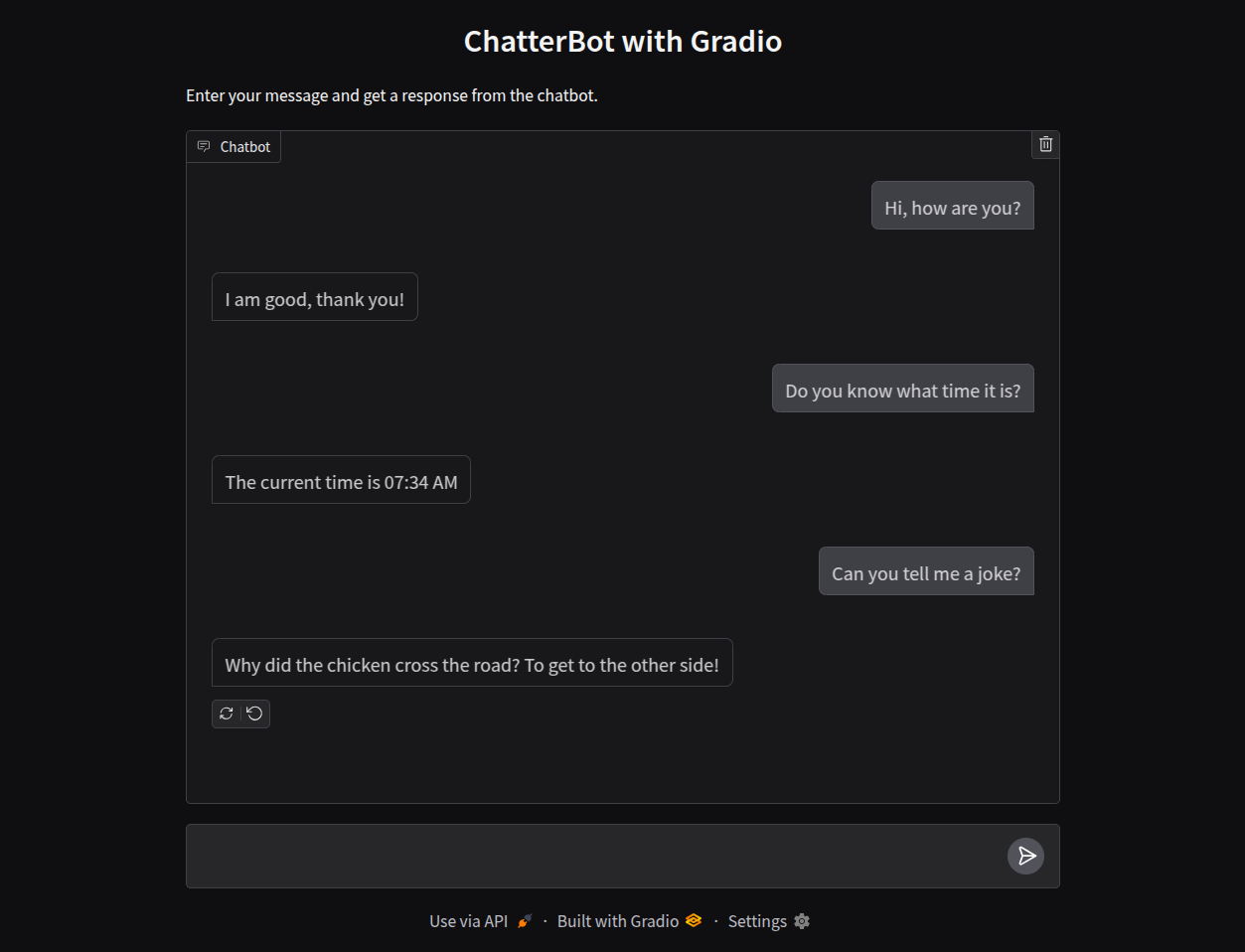
<p>Navigate to <code class="language-plaintext highlighter-rouge">http://localhost:5000</code> in your browser. You should have a chat interface available:</p>

<p><img src="/img/screenshots/gradio-chatterbot.png" alt="The Gradio chat interface on localhost" /></p>

<h2 id="sharing">Sharing</h2>

<p>Gradio supports a method allowing you to <a href="https://www.gradio.app/guides/sharing-your-app">create a public link</a> to the app you’re created. The code itself stays running on your machine, but a unique public url will be generated by the Gradio Share Servers to forward traffic.</p>

<p>To set this up you can make the following 1-line change to your code:</p>

<div class="language-diff highlighter-rouge"><div class="highlight"><pre class="highlight"><code># diff: add share=True to the launch parameters
<span class="err">
</span><span class="gd">-interface.launch(server_port=9000)
</span><span class="gi">+interface.launch(server_port=9000, share=True)
</span></code></pre></div></div>

<p>Optionally, if you have concerns about this link being publicly accessible, you can also include the following additions so that authentication is required before users can interact with your shared app:</p>

<div class="language-python highlighter-rouge"><div class="highlight"><pre class="highlight"><code><span class="k">def</span> <span class="nf">example_auth</span><span class="p">(</span><span class="n">username</span><span class="p">,</span> <span class="n">password</span><span class="p">):</span>
    <span class="sh">"""</span><span class="s">
    NOTE: When implementing authentication beyond the purposes of
    this example, you can have this function check against an auth
    provider or other secure keystore.
    </span><span class="sh">"""</span>
    <span class="k">return</span> <span class="n">username</span> <span class="o">==</span> <span class="sh">'</span><span class="s">admin</span><span class="sh">'</span> <span class="ow">and</span> <span class="n">password</span> <span class="o">==</span> <span class="sh">'</span><span class="s">password</span><span class="sh">'</span>

<span class="n">interface</span><span class="p">.</span><span class="nf">launch</span><span class="p">(</span><span class="n">server_port</span><span class="o">=</span><span class="mi">9000</span><span class="p">,</span> <span class="n">share</span><span class="o">=</span><span class="bp">True</span><span class="p">,</span> <span class="n">auth</span><span class="o">=</span><span class="n">example_auth</span><span class="p">)</span>
</code></pre></div></div>

<p>Next, use <code class="language-plaintext highlighter-rouge">ctrl c</code> to stop your app and then rerun it with the <code class="language-plaintext highlighter-rouge">python</code> command from earlier. This time we should see the following output:</p>

<div class="language-plaintext highlighter-rouge"><div class="highlight"><pre class="highlight"><code>* Running on local URL:  http://127.0.0.1:9000
* Running on public URL: https://00609f9247dec67ca3.gradio.live

This share link expires in 72 hours. For free permanent hosting and GPU upgrades,
run `gradio deploy` from the terminal in the working directory to deploy
to Hugging Face Spaces (https://huggingface.co/spaces)
</code></pre></div></div>

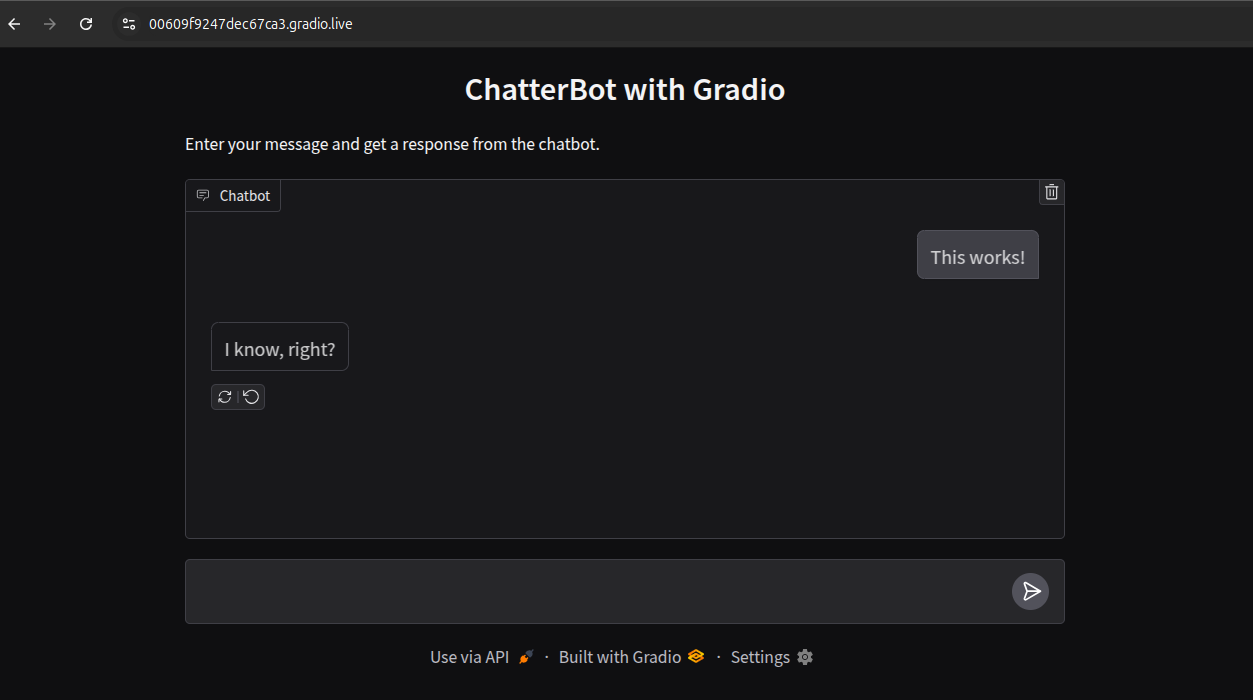
<p>Now, we can navigate to that public URL in out browser. If you chose to include the authentication changes noted previously you’ll be required to login.</p>

<p><img src="/img/screenshots/gradio-chatterbot-login.png" alt="Login view for the shared Gradio app" /></p>

<p>Your shared link should then be accessible:</p>

<p><img src="/img/screenshots/gradio-chatterbot-shared.png" alt="Login view for the shared Gradio app" /></p>

<h2 id="conclusion">Conclusion</h2>

<p>This wraps up our simple example showing how to share a instance of ChatterBot using Gradio. Be sure to look over the <a href="https://www.gradio.app/guides/creating-a-chatbot-fast">other examples</a> Gradio has on their site since they support a lot more functionality than just chat interfaces. For example, in <a href="https://huggingface.co/blog/gradio-mcp">a recent blog post</a> they announced that Gradio servers like the one we launched here can also be used as <a href="https://docs.chatterbot.us/glossary/#term-MCP">MCP servers</a> (basically adding <code class="language-plaintext highlighter-rouge">mcp_server=True</code> to the <code class="language-plaintext highlighter-rouge">launch</code> parameters, see their docs for the full implementation and usage details).</p>]]></content><author><name>{&quot;picture&quot;=&gt;&quot;/img/chatterbot.png&quot;, &quot;github&quot;=&gt;&quot;gunthercox&quot;, &quot;twitter&quot;=&gt;&quot;gunthercox&quot;, &quot;website&quot;=&gt;&quot;https://gunthercox.com&quot;}</name></author><category term="apps" /><category term="deployment" /><category term="chatterbot" /><category term="interfaces" /><category term="Gradio" /><summary type="html"><![CDATA[Build and deploy a shareable chatbot interface quickly using Gradio's machine learning demo tools with ChatterBot for rapid prototyping and testing.]]></summary><media:thumbnail xmlns:media="http://search.yahoo.com/mrss/" url="https://chatterbot.us/img/articles/02-brick.jpg" /><media:content medium="image" url="https://chatterbot.us/img/articles/02-brick.jpg" xmlns:media="http://search.yahoo.com/mrss/" /></entry><entry><title type="html">Measuring Chatbot Climate Impact with CodeCarbon</title><link href="https://chatterbot.us/2025/04/codecarbon/" rel="alternate" type="text/html" title="Measuring Chatbot Climate Impact with CodeCarbon" /><published>2025-04-29T07:03:03+00:00</published><updated>2025-04-29T07:03:03+00:00</updated><id>https://chatterbot.us/2025/04/codecarbon</id><content type="html" xml:base="https://chatterbot.us/2025/04/codecarbon/"><![CDATA[<p>This past <a href="https://en.wikipedia.org/wiki/Earth_Day">Earth Day</a> GitHub shared their <a href="https://github.com/social-impact/focus-areas/environmental-sustainability/climate-action-plan-for-developers">Climate Action Plan for Developers</a>, a collection of resources designed to create tangible steps that developers can use to improve how software impacts the planet.</p>

<p>This concept has become increasingly relevant as of late with the increasing use of generative AI. A trend in recent news has been to point out the sometimes staggering statistics around the use of water for cooling the hardware on which many AI systems run, as well as the use of electricity. A <a href="https://www.washingtonpost.com/technology/2024/09/18/energy-ai-use-electricity-water-data-centers/">2024 article from The Washington Post</a> reports estimates that models such as GPT-4 require approximately 1 bottle’s worth of water (519 milliliters) to write a 100-word email. That same email also consumes roughly the same amount of energy as turning on 14 LED light bulbs for 1 hour (0.14 kilowatt-hours).</p>

<p>Highlighted amidst GitHub’s list of environmental impact tools was a project called <strong>CodeCarbon</strong>, a Python library designed to allow developers to estimate the carbon footprint of their work in the form of kilograms of CO₂-equivalents (CO₂eq). Their <a href="https://mlco2.github.io/codecarbon/motivation.html">documentation</a> dives further into the motivation and methodology used to implement their statistics.</p>

<p>To test out <code class="language-plaintext highlighter-rouge">codecarbon</code> we put the following example together, demonstrating the initialization of a simple chat bot, with a small amount of training data.</p>

<h2 id="code-setup">Code Setup</h2>

<div class="language-bash highlighter-rouge"><div class="highlight"><pre class="highlight"><code>pip <span class="nb">install </span>codecarbon chatterbot[dev]
</code></pre></div></div>

<p>Our example code will be as follows:</p>

<div class="language-python highlighter-rouge"><div class="highlight"><pre class="highlight"><code><span class="c1"># codecarbon-example.py
</span>
<span class="kn">from</span> <span class="n">codecarbon</span> <span class="kn">import</span> <span class="n">EmissionsTracker</span>
<span class="kn">from</span> <span class="n">chatterbot</span> <span class="kn">import</span> <span class="n">ChatBot</span>
<span class="kn">from</span> <span class="n">chatterbot.trainers</span> <span class="kn">import</span> <span class="n">ListTrainer</span>


<span class="k">with</span> <span class="nc">EmissionsTracker</span><span class="p">()</span> <span class="k">as</span> <span class="n">tracker</span><span class="p">:</span>

    <span class="n">chatbot</span> <span class="o">=</span> <span class="nc">ChatBot</span><span class="p">(</span>
        <span class="sh">"</span><span class="s">Chatbot</span><span class="sh">"</span><span class="p">,</span>
        <span class="n">storage_adapter</span><span class="o">=</span><span class="sh">"</span><span class="s">chatterbot.storage.SQLStorageAdapter</span><span class="sh">"</span><span class="p">,</span>
        <span class="n">logic_adapters</span><span class="o">=</span><span class="p">[</span>
            <span class="sh">"</span><span class="s">chatterbot.logic.BestMatch</span><span class="sh">"</span><span class="p">,</span>
            <span class="sh">"</span><span class="s">chatterbot.logic.TimeLogicAdapter</span><span class="sh">"</span>
        <span class="p">],</span>
        <span class="n">database_uri</span><span class="o">=</span><span class="sh">"</span><span class="s">sqlite:///database.sqlite3</span><span class="sh">"</span>
    <span class="p">)</span>

    <span class="c1"># Train the chatbot with a small amount of simple data
</span>
    <span class="n">trainer</span> <span class="o">=</span> <span class="nc">ListTrainer</span><span class="p">(</span><span class="n">chatbot</span><span class="p">)</span>

    <span class="n">trainer</span><span class="p">.</span><span class="nf">train</span><span class="p">([</span>
        <span class="sh">"</span><span class="s">Hello, how are you?</span><span class="sh">"</span><span class="p">,</span>
        <span class="sh">"</span><span class="s">I am good, thank you!</span><span class="sh">"</span><span class="p">,</span>
        <span class="sh">"</span><span class="s">You</span><span class="sh">'</span><span class="s">re welcome!</span><span class="sh">"</span><span class="p">,</span>
    <span class="p">])</span>

    <span class="n">trainer</span><span class="p">.</span><span class="nf">train</span><span class="p">([</span>
        <span class="sh">"</span><span class="s">Who are you?</span><span class="sh">"</span><span class="p">,</span>
        <span class="sh">"</span><span class="s">I am a chatbot built using ChatterBot.</span><span class="sh">"</span><span class="p">,</span>
        <span class="sh">"</span><span class="s">It</span><span class="sh">'</span><span class="s">s nice to meet you!</span><span class="sh">"</span><span class="p">,</span>
        <span class="sh">"</span><span class="s">Thanks, it</span><span class="sh">'</span><span class="s">s nice to meet you too!</span><span class="sh">"</span><span class="p">,</span>
    <span class="p">])</span>

    <span class="n">message</span> <span class="o">=</span> <span class="sh">"</span><span class="s">Hello, how are you?</span><span class="sh">"</span>

    <span class="n">response</span> <span class="o">=</span> <span class="n">chatbot</span><span class="p">.</span><span class="nf">get_response</span><span class="p">(</span><span class="n">message</span><span class="p">)</span>

    <span class="nf">print</span><span class="p">(</span><span class="sa">f</span><span class="sh">"</span><span class="s">Chatbot response: </span><span class="si">{</span><span class="n">response</span><span class="p">.</span><span class="n">text</span><span class="si">}</span><span class="sh">"</span><span class="p">)</span>

<span class="c1"># Display the tracked emissions data
</span>
<span class="nf">print</span><span class="p">(</span><span class="sa">f</span><span class="sh">"</span><span class="s">Carbon emissions from computation: </span><span class="si">{</span><span class="n">tracker</span><span class="p">.</span><span class="n">final_emissions</span> <span class="o">*</span> <span class="mi">1000</span><span class="si">:</span><span class="p">.</span><span class="mi">4</span><span class="n">f</span><span class="si">}</span><span class="s"> g CO2eq</span><span class="sh">"</span><span class="p">)</span>
<span class="nf">print</span><span class="p">(</span><span class="sh">"</span><span class="s">Detailed emissions data:</span><span class="sh">"</span><span class="p">,</span> <span class="n">tracker</span><span class="p">.</span><span class="n">final_emissions_data</span><span class="p">)</span>

</code></pre></div></div>

<h2 id="results">Results</h2>

<p>Next, running the code using <code class="language-plaintext highlighter-rouge">python codecarbon-example.py</code> yields the analyzed run for our chat bot. Let’s take a look at some of the results:</p>

<div class="language-plaintext highlighter-rouge"><div class="highlight"><pre class="highlight"><code>The below tracking methods have been set up:
    RAM Tracking Method: RAM power estimation model
    CPU Tracking Method: cpu_load
    GPU Tracking Method: Unspecified

&gt;&gt;&gt; Tracker's metadata:
  Python version: 3.12.2
  CodeCarbon version: 3.0.0
  Available RAM : 30.541 GB
  CPU count: 4 thread(s) in 1 physical CPU(s)
  CPU model: Intel(R) Core(TM) i7

Energy consumed for RAM : 0.000009 kWh. RAM Power : 10.0 W
Delta energy consumed for CPU with cpu_load : 0.000010 kWh, power : 10.89 W
Energy consumed for All CPU : 0.000010 kWh
0.000018 kWh of electricity used since the beginning.
Carbon emissions from computation: 0.0068 g CO2eq
</code></pre></div></div>

<p>ChatterBot’s resource usage is relatively low in this example, likely for a few reasons. Since we used a small amount of training data fewer resources are required to process it. This example is also using ChatterBot’s default search-based response generation (designed to run efficiently on smaller devices such as the Raspberry Pi), which is less processing intensive in most cases compared to using generative models.</p>

<p>Check out CodeCarbon’s <a href="https://mlco2.github.io/codecarbon/usage.html">Quickstart guide</a> for more examples of ways their library can be used. Likewise the documentation for ChatterBot can be found at <a href="https://docs.chatterbot.us/">docs.chatterbot.us</a></p>]]></content><author><name>{&quot;picture&quot;=&gt;&quot;/img/chatterbot.png&quot;, &quot;github&quot;=&gt;&quot;gunthercox&quot;, &quot;twitter&quot;=&gt;&quot;gunthercox&quot;, &quot;website&quot;=&gt;&quot;https://gunthercox.com&quot;}</name></author><category term="libraries" /><category term="climate" /><category term="libraries" /><summary type="html"><![CDATA[Discover how to measure and track the environmental impact of your AI chatbot using CodeCarbon to estimate carbon emissions, energy consumption, and resource usage.]]></summary><media:thumbnail xmlns:media="http://search.yahoo.com/mrss/" url="https://chatterbot.us/img/articles/01-field.jpg" /><media:content medium="image" url="https://chatterbot.us/img/articles/01-field.jpg" xmlns:media="http://search.yahoo.com/mrss/" /></entry><entry><title type="html">Responding using rule-based matching with spaCy</title><link href="https://chatterbot.us/2025/04/rule-based-matching-with-spaCy/" rel="alternate" type="text/html" title="Responding using rule-based matching with spaCy" /><published>2025-04-27T09:03:03+00:00</published><updated>2025-04-27T09:03:03+00:00</updated><id>https://chatterbot.us/2025/04/rule-based-matching-with-spaCy</id><content type="html" xml:base="https://chatterbot.us/2025/04/rule-based-matching-with-spaCy/"><![CDATA[<p>ChatterBot includes logic adapters that support <a href="https://spacy.io/usage/rule-based-matching">spaCy’s rule-based matching</a> as a method for selecting responses to input statements. This functionality can be useful for cases where you need a chat bot to respond or carry out actions for specific inputs.</p>

<div class="alert alert-info">
    This tutorial requires <a href="https://pypi.org/project/ChatterBot/">ChatterBot 1.2.3 or newer</a>.
</div>

<h2 id="matching-phrase-patterns">Matching phrase patterns</h2>

<p>To get started we’ll need to set up a chat bot using the <a href="https://docs.chatterbot.us/logic/#specific-response-adapter"><code class="language-plaintext highlighter-rouge">SpecificResponseAdapter</code></a> class.</p>

<div class="language-python highlighter-rouge"><div class="highlight"><pre class="highlight"><code><span class="c1"># tutorial.py
</span>
<span class="kn">from</span> <span class="n">chatterbot</span> <span class="kn">import</span> <span class="n">ChatBot</span>

<span class="n">chatbot</span> <span class="o">=</span> <span class="nc">ChatBot</span><span class="p">(</span>
    <span class="sh">'</span><span class="s">Example Bot</span><span class="sh">'</span><span class="p">,</span>
    <span class="n">logic_adapters</span><span class="o">=</span><span class="p">[</span>
        <span class="p">{</span>
            <span class="sh">'</span><span class="s">import_path</span><span class="sh">'</span><span class="p">:</span> <span class="sh">'</span><span class="s">chatterbot.logic.SpecificResponseAdapter</span><span class="sh">'</span><span class="p">,</span>
            <span class="sh">'</span><span class="s">input_text</span><span class="sh">'</span><span class="p">:</span> <span class="sh">'</span><span class="s">What is your name?</span><span class="sh">'</span><span class="p">,</span>
            <span class="sh">'</span><span class="s">output_text</span><span class="sh">'</span><span class="p">:</span> <span class="sh">'</span><span class="s">My name is ChatterBot.</span><span class="sh">'</span>
        <span class="p">},</span>
        <span class="p">{</span>
        <span class="sh">'</span><span class="s">import_path</span><span class="sh">'</span><span class="p">:</span> <span class="sh">'</span><span class="s">chatterbot.logic.BestMatch</span><span class="sh">'</span><span class="p">,</span>
            <span class="sh">'</span><span class="s">default_response</span><span class="sh">'</span><span class="p">:</span> <span class="sh">'</span><span class="s">I am sorry, please try asking a different question.</span><span class="sh">'</span><span class="p">,</span>
            <span class="sh">'</span><span class="s">maximum_similarity_threshold</span><span class="sh">'</span><span class="p">:</span> <span class="mf">0.90</span>
        <span class="p">}</span>
    <span class="p">]</span>
<span class="p">)</span>

<span class="n">response</span> <span class="o">=</span> <span class="n">chatbot</span><span class="p">.</span><span class="nf">get_response</span><span class="p">(</span><span class="sh">'</span><span class="s">What is your name?</span><span class="sh">'</span><span class="p">)</span>
<span class="nf">print</span><span class="p">(</span><span class="n">response</span><span class="p">)</span>

<span class="n">response</span> <span class="o">=</span> <span class="n">chatbot</span><span class="p">.</span><span class="nf">get_response</span><span class="p">(</span><span class="sh">'</span><span class="s">What is your purpose?</span><span class="sh">'</span><span class="p">)</span>
<span class="nf">print</span><span class="p">(</span><span class="n">response</span><span class="p">)</span>
</code></pre></div></div>

<p>By default, the <code class="language-plaintext highlighter-rouge">SpecificResponseAdapter</code> uses a case-sensitive exact match to determine if the input statement matches its defined <code class="language-plaintext highlighter-rouge">input_text</code> value. Only when an exact match is found, will the response will be returned with a confidence of 1. Otherwise, the response will be returned with a confidence of 0, and the next logic adapter in the list will be used to select a response. In this case, the <code class="language-plaintext highlighter-rouge">BestMatch</code> logic adapter is used as a fallback, configured with a predefined <code class="language-plaintext highlighter-rouge">default_response</code>.</p>

<p>Matching an exact string is not always practical, in some cases for example it may be necessary to match a part or phrase pattern contained within a string of text. To achieve this, we can use spaCy’s rule-based matching to define a pattern that the input statement must match.</p>

<div class="language-python highlighter-rouge"><div class="highlight"><pre class="highlight"><code><span class="c1"># tutorial.py
</span>
<span class="kn">from</span> <span class="n">chatterbot</span> <span class="kn">import</span> <span class="n">ChatBot</span>
<span class="kn">from</span> <span class="n">spacy.matcher</span> <span class="kn">import</span> <span class="n">Matcher</span>

<span class="c1"># Pattern to match phrases close to "check if the website is up"
# and "check is the website is down"
</span><span class="n">pattern</span> <span class="o">=</span> <span class="p">[</span>
    <span class="p">{</span><span class="sh">'</span><span class="s">LOWER</span><span class="sh">'</span><span class="p">:</span> <span class="sh">'</span><span class="s">check</span><span class="sh">'</span><span class="p">},</span> <span class="p">{},</span> <span class="p">{},</span> <span class="p">{</span><span class="sh">'</span><span class="s">LOWER</span><span class="sh">'</span><span class="p">:</span> <span class="sh">'</span><span class="s">website</span><span class="sh">'</span><span class="p">},</span> <span class="p">{},</span>
    <span class="p">{</span><span class="sh">'</span><span class="s">LEMMA</span><span class="sh">'</span><span class="p">:</span> <span class="p">{</span><span class="sh">'</span><span class="s">IN</span><span class="sh">'</span><span class="p">:</span> <span class="p">[</span><span class="sh">'</span><span class="s">up</span><span class="sh">'</span><span class="p">,</span> <span class="sh">'</span><span class="s">down</span><span class="sh">'</span><span class="p">]}}</span>
<span class="p">]</span>

<span class="n">chatbot</span> <span class="o">=</span> <span class="nc">ChatBot</span><span class="p">(</span>
    <span class="sh">'</span><span class="s">Example Bot</span><span class="sh">'</span><span class="p">,</span>
    <span class="n">logic_adapters</span><span class="o">=</span><span class="p">[</span>
        <span class="p">{</span>
            <span class="sh">'</span><span class="s">import_path</span><span class="sh">'</span><span class="p">:</span> <span class="sh">'</span><span class="s">chatterbot.logic.SpecificResponseAdapter</span><span class="sh">'</span><span class="p">,</span>
            <span class="sh">'</span><span class="s">matcher</span><span class="sh">'</span><span class="p">:</span> <span class="n">Matcher</span><span class="p">,</span>
            <span class="sh">'</span><span class="s">input_text</span><span class="sh">'</span><span class="p">:</span> <span class="n">pattern</span><span class="p">,</span>
            <span class="sh">'</span><span class="s">output_text</span><span class="sh">'</span><span class="p">:</span> <span class="sh">'</span><span class="s">I will check the website status.</span><span class="sh">'</span>
        <span class="p">},</span>
        <span class="p">{</span>
        <span class="sh">'</span><span class="s">import_path</span><span class="sh">'</span><span class="p">:</span> <span class="sh">'</span><span class="s">chatterbot.logic.BestMatch</span><span class="sh">'</span><span class="p">,</span>
            <span class="sh">'</span><span class="s">default_response</span><span class="sh">'</span><span class="p">:</span> <span class="sh">'</span><span class="s">I am sorry, please try asking a different question.</span><span class="sh">'</span><span class="p">,</span>
            <span class="sh">'</span><span class="s">maximum_similarity_threshold</span><span class="sh">'</span><span class="p">:</span> <span class="mf">0.90</span>
        <span class="p">}</span>
    <span class="p">]</span>
<span class="p">)</span>

<span class="n">response</span> <span class="o">=</span> <span class="n">chatbot</span><span class="p">.</span><span class="nf">get_response</span><span class="p">(</span><span class="sh">'</span><span class="s">Check if the website is up</span><span class="sh">'</span><span class="p">)</span>
<span class="nf">print</span><span class="p">(</span><span class="n">response</span><span class="p">)</span>

<span class="n">response</span> <span class="o">=</span> <span class="n">chatbot</span><span class="p">.</span><span class="nf">get_response</span><span class="p">(</span><span class="sh">'</span><span class="s">Check if the website is down</span><span class="sh">'</span><span class="p">)</span>
<span class="nf">print</span><span class="p">(</span><span class="n">response</span><span class="p">)</span>
</code></pre></div></div>

<div class="alert alert-info">
    An alternative to the <code>Matcher</code> class is the <a href="https://spacy.io/usage/rule-based-matching#phrasematcher"><code>PhraseMatcher</code></a> class, which can be used to match against a list of phrases (strings).
</div>

<h2 id="calling-a-function-in-response-to-a-match">Calling a function in response to a match</h2>

<p>In some cases, it may be necessary to call a function in response to a match. This can be achieved by defining a function that takes the input statement as an argument, and then passing that function to the <code class="language-plaintext highlighter-rouge">output_text</code> parameter.</p>

<div class="language-python highlighter-rouge"><div class="highlight"><pre class="highlight"><code><span class="c1"># tutorial.py
</span>
<span class="kn">from</span> <span class="n">chatterbot</span> <span class="kn">import</span> <span class="n">ChatBot</span>
<span class="kn">from</span> <span class="n">spacy.matcher</span> <span class="kn">import</span> <span class="n">Matcher</span>

<span class="k">def</span> <span class="nf">check_website_status</span><span class="p">():</span>
    <span class="kn">from</span> <span class="n">urllib.request</span> <span class="kn">import</span> <span class="n">urlopen</span>

    <span class="n">HOSTNAME</span> <span class="o">=</span> <span class="sh">'</span><span class="s">https://docs.chatterbot.us/</span><span class="sh">'</span>

    <span class="k">try</span><span class="p">:</span>
        <span class="nf">urlopen</span><span class="p">(</span><span class="n">HOSTNAME</span><span class="p">)</span>
        <span class="k">return</span> <span class="sh">'</span><span class="s">The website is up.</span><span class="sh">'</span>
    <span class="k">except</span> <span class="nb">Exception</span><span class="p">:</span>
        <span class="k">return</span> <span class="sh">'</span><span class="s">The website is down.</span><span class="sh">'</span>

<span class="n">pattern</span> <span class="o">=</span> <span class="p">[</span>
    <span class="p">{</span><span class="sh">'</span><span class="s">LOWER</span><span class="sh">'</span><span class="p">:</span> <span class="sh">'</span><span class="s">check</span><span class="sh">'</span><span class="p">},</span> <span class="p">{},</span> <span class="p">{},</span> <span class="p">{</span><span class="sh">'</span><span class="s">LOWER</span><span class="sh">'</span><span class="p">:</span> <span class="sh">'</span><span class="s">website</span><span class="sh">'</span><span class="p">},</span> <span class="p">{},</span>
    <span class="p">{</span><span class="sh">'</span><span class="s">LEMMA</span><span class="sh">'</span><span class="p">:</span> <span class="p">{</span><span class="sh">'</span><span class="s">IN</span><span class="sh">'</span><span class="p">:</span> <span class="p">[</span><span class="sh">'</span><span class="s">up</span><span class="sh">'</span><span class="p">,</span> <span class="sh">'</span><span class="s">down</span><span class="sh">'</span><span class="p">]}}</span>
<span class="p">]</span>

<span class="n">chatbot</span> <span class="o">=</span> <span class="nc">ChatBot</span><span class="p">(</span>
    <span class="sh">'</span><span class="s">Example Bot</span><span class="sh">'</span><span class="p">,</span>
    <span class="n">logic_adapters</span><span class="o">=</span><span class="p">[</span>
        <span class="p">{</span>
            <span class="sh">'</span><span class="s">import_path</span><span class="sh">'</span><span class="p">:</span> <span class="sh">'</span><span class="s">chatterbot.logic.SpecificResponseAdapter</span><span class="sh">'</span><span class="p">,</span>
            <span class="sh">'</span><span class="s">matcher</span><span class="sh">'</span><span class="p">:</span> <span class="n">Matcher</span><span class="p">,</span>
            <span class="sh">'</span><span class="s">input_text</span><span class="sh">'</span><span class="p">:</span> <span class="n">pattern</span><span class="p">,</span>
            <span class="sh">'</span><span class="s">output_text</span><span class="sh">'</span><span class="p">:</span> <span class="n">check_website_status</span>
        <span class="p">},</span>
        <span class="p">{</span>
        <span class="sh">'</span><span class="s">import_path</span><span class="sh">'</span><span class="p">:</span> <span class="sh">'</span><span class="s">chatterbot.logic.BestMatch</span><span class="sh">'</span><span class="p">,</span>
            <span class="sh">'</span><span class="s">default_response</span><span class="sh">'</span><span class="p">:</span> <span class="sh">'</span><span class="s">I am sorry, please try asking a different question.</span><span class="sh">'</span><span class="p">,</span>
            <span class="sh">'</span><span class="s">maximum_similarity_threshold</span><span class="sh">'</span><span class="p">:</span> <span class="mf">0.90</span>
        <span class="p">}</span>
    <span class="p">]</span>
<span class="p">)</span>

<span class="n">response</span> <span class="o">=</span> <span class="n">chatbot</span><span class="p">.</span><span class="nf">get_response</span><span class="p">(</span><span class="sh">'</span><span class="s">Check if the website is up</span><span class="sh">'</span><span class="p">)</span>
<span class="nf">print</span><span class="p">(</span><span class="n">response</span><span class="p">)</span>

<span class="n">response</span> <span class="o">=</span> <span class="n">chatbot</span><span class="p">.</span><span class="nf">get_response</span><span class="p">(</span><span class="sh">'</span><span class="s">Check if the website is down</span><span class="sh">'</span><span class="p">)</span>
<span class="nf">print</span><span class="p">(</span><span class="n">response</span><span class="p">)</span>
</code></pre></div></div>

<h2 id="conclusion">Conclusion</h2>

<p>We’ve covered a few different examples of using spaCy’s rule-based matching to detect specific responses for a ChatterBot instance. For your own projects these rules can be as simple or as complex as you see fit.</p>]]></content><author><name>{&quot;picture&quot;=&gt;&quot;/img/chatterbot.png&quot;, &quot;github&quot;=&gt;&quot;gunthercox&quot;, &quot;twitter&quot;=&gt;&quot;gunthercox&quot;, &quot;website&quot;=&gt;&quot;https://gunthercox.com&quot;}</name></author><category term="spaCy" /><category term="nlp" /><category term="chatterbot" /><category term="spaCy" /><category term="nlp" /><summary type="html"><![CDATA[Learn how to implement rule-based pattern matching in ChatterBot using spaCy's Matcher to create intelligent, context-aware chatbot responses for specific user inputs.]]></summary><media:thumbnail xmlns:media="http://search.yahoo.com/mrss/" url="https://chatterbot.us/img/articles/00-lights.jpg" /><media:content medium="image" url="https://chatterbot.us/img/articles/00-lights.jpg" xmlns:media="http://search.yahoo.com/mrss/" /></entry></feed>